 ZenPayoff is a 100% free tool. No hidden fees. No forced registration required.
Which is better, Excel or custom web calculators for tracking debt?
Comparison graphic showing setup time and error risk for Excel spreadsheets versus dedicated web calculators
Which is better, Excel or custom web calculators, when it comes to debt tracking?
The decision between using an Excel template for paying off debt and a dedicated web-based calculator is not about which is objectively better. It depends on which fits how you handle your finances. Having developed and examined both tools, the answer comes down to two things: how many debts you track and how often your circumstances change.
What Excel and Spreadsheet Templates Do Well
A well-built Excel or Google Sheets debt payoff template offers advantages a web calculator generally can’t match:
- Full customisation is possible, letting you include columns specific to your circumstances—such as a flag for a joint account, a note about an expiring promotional rate, or a custom payoff order combining snowball and avalanche methods.
- Data is stored in a private, permanent file you control rather than on a third-party server. This is important when tracking sensitive account details.
- When managing six, eight, or more debts of different kinds (such as credit cards, loans, and medical bills), the row-oriented format of a spreadsheet works more naturally. Most simple web calculators are designed to handle only one debt or a small fixed number.
- You can keep a running record of actual payments and balances each month, creating a file to review later. Most one-off web calculators do not keep this record.
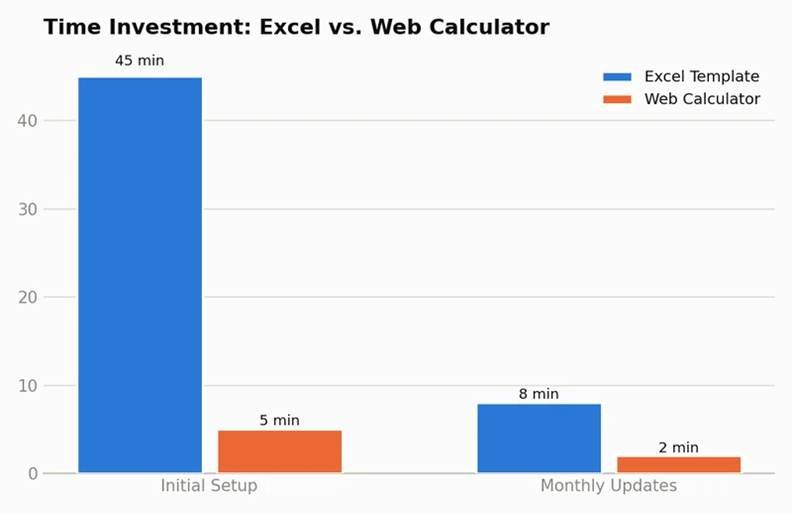
Bar chart comparing setup time and update time between Excel and a web calculator
What Web Calculators Do Well
A dedicated web-based debt payoff calculator has its own clear advantages:
- There’s no template to download and no formulas to understand—you just input your numbers and then get the answer in a matter of seconds.
- The formula will be accurate as standard. A good calculator has already got the amortization calculations right, while a spreadsheet that you build yourself is at risk of making formula errors which may go undetected for months.
- You can carry out comparisons using many web-based calculators, these being particularly designed to allow you to compare a snowball scenario with an avalanche one, or to test a “what if I paid $50 more” scenario, without the need to understand or rework the original formulas.
- There is no risk of maintenance. Spreadsheets tend to build up errors over time when you copy formulas into new rows or accidentally overwrite a cell, whereas the logic of a web calculator does not deteriorate with use.
The Math on Error Risk
The aspect that most people omit when making comparisons is that with spreadsheets that you build yourself there is a real risk of a formula appearing to be correct but in fact giving slightly incorrect figures—for instance, by using an approximate monthly interest rate rather than taking into account daily accrual, which can result in interest being understated by 5 to 8% on a loan with a high APR over the course of a year. If the balance is $5,000 and the APR is 24%, an underestimation of interest by 8% means that your annual total payoff cost is underestimated by about $60 to $70—not something that is catastrophic, but enough to affect your projected payoff date if this error is carried forward over a multi-year plan and applies to several accounts.
When Excel Is the Better Choice
When you are looking after four or more debts that are of different kinds, carry different interest rates, and have various payment schedules, and if you are either familiar with or are willing to learn some basic spreadsheet formulas, then a properly constructed Excel or Sheets template will allow you to deal with your particular circumstances, such as having a custom priority order or employing a hybrid strategy. You are able to obtaina premium debt repayment spreadsheet that has already been set up with the right formulas for daily accrual and includes automatic rolling payments, thus eliminating the risk of making formula errors when constructing it yourself while still maintaining full flexibility in using a spreadsheet.
When a Web Calculator Is the Better Choice
When you are looking after one to three debts, prefer a quick answer and do not want to have to build or keep a template, or are specifically interested in comparing the different debt payoff methods (such as the snowball, the avalanche, or a custom hybrid) without carrying out the actual mathematical calculations yourself, then a specialised calculator is quicker and less risky. You can use our free debt payoff calculator to work out a model of your particular debts and compare the various strategies against one another in less than a minute, without needing to build any formulas.
The Hybrid Approach Many People Actually Use
In reality, a good method for most people is to combine both approaches: first use a web-based calculator to quickly evaluate their strategic options (for example, should they snowball or avalanche? Is consolidation worthwhile?), and then use a spreadsheet to keep record of the month-by-month implementation of the plan they have decided on. In this way, you gain the advantages of both tools—rapid and accurate answers to strategic questions from the calculator and thorough, continuous tracking from the spreadsheet—without asking either one to carry out a task for which it was not designed.
What to Check Before Trusting Any Tool
Regardless of which tool you choose, verify it accounts for:
- Interest is calculated on a daily or monthly basis in accordance with the method actually used by your card or loan (most credit cards employ daily accrual; refer to your cardholder agreement).
- The rolling-payment effect involves a situation in which the payment made possible by the clearing of one account is automatically passed on to the next.
- The true APR, not an estimated or rounded one — a difference of just one point has a significant impact over the course of a multi-year repayment period.
Common Mistakes When Choosing a Tool
- For a simple case involving one or two debts, constructing an excessively complicated spreadsheet is unnecessary since a simple calculator would provide the answer more quickly.
- To use a free online calculator without verifying its assumptions—for example, those that employ simplified approximations of the monthly interest—can result in a meaningful underestimation of the actual costs on accounts with a high APR.
- Failing to update the spreadsheet after the first month and thus allowing it to become out of date and misleading within a few months of actual use.
- Disregarding formula errors that result in a number that looks plausible but is actually wrong, just because the spreadsheet “appears” to be complete.
What the Data Supports
The explanation of amortization given by Investopedia covers the mathematics that both of the tools have to get right, and if this is done incorrectly—whether in a spreadsheet formula or in a faulty calculator—it leads to the same problem further down the line: a payoff date and a total interest that do not match reality. The consumer credit data from the Federal Reserve shows how important accuracy is on a large scale, since revolving balances are common among U.S. households.
A Practical Starting Point If You’re Unsure
IIf you don’t know which category you belong in, use a simple online calculator to begin with and tackle the major strategic question—whether it’s snowball, avalanche, consolidation, or a hybrid. After you’ve made your choice, determine if your case is simple enough to keep in mind or to assess using a basic statement review (for example, one or two debts with steady payments) or complex enough to justify the use of a dedicated spreadsheet (such as when there are multiple accounts, the interest rates are changing, or a mixed payoff strategy is involved). Generally, people tend to overestimate the amount of ongoing tracking complexity they’ll need right at the start and then underestimate it a few months later, after real-world deviations from the original plan have started to build up.WWhat does it mean to have a dedicated budgeting app?AThere is also a third type of app worth mentioning briefly: those comprehensive budgeting apps which have debt tracking as just one of their features. They can be effective if you already make use of such an app for general budgeting, but they are generally not specifically designed for the kind of amortization calculations required by a debt payoff plan — so treat them as a supplement rather than as a replacement for a dedicated debt calculator or spreadsheet if it is important to you to have accurate payoff projections.
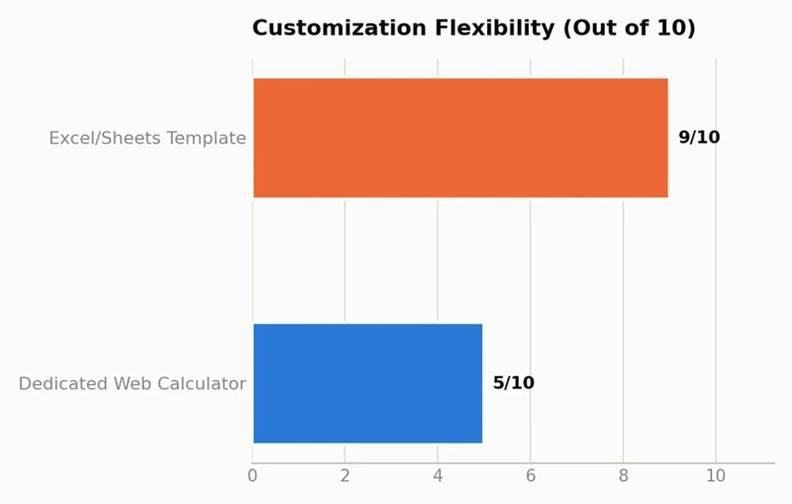
Horizontal bar chart scoring Excel and web calculators on customization flexibility
The Bottom Line
There is no single option that is better than the other—whether to use Excel or a web-based calculator depends on how many debts you are dealing with and on whether you need continuous, detailed tracking or just a quick strategic answer. In most cases, people can take the calculator for making major strategic decisions and use a spreadsheet for carrying out month-by-month tasks, thus making use of the advantages of both tools without having to face the drawbacks of either.