 ZenPayoff is a 100% free tool. No hidden fees. No forced registration required.
 Help center
Last updated: August 2026
Welcome to the ZenPayoff Help Center. Our mission is to demystify complex debt calculations and provide you with the tools you need to achieve financial freedom. Below, you will find detailed information on how to use our platform, how your data is protected, and how our digital product delivery works.
1. Using the Debt Payoff Calculator
Our core tool is the interactive Debt Payoff Engine, designed to give you real-time visual feedback on your financial trajectory without requiring sensitive bank connections.
How to Get Started
Navigate to the homepage calculator and input your current debts. For each debt, you will need to provide the Balance, the Interest Rate (APR), and the Minimum Monthly Payment. You do not need to provide your Social Security Number or connect your bank account via third-party apps. All data entry is manual to ensure your absolute privacy.
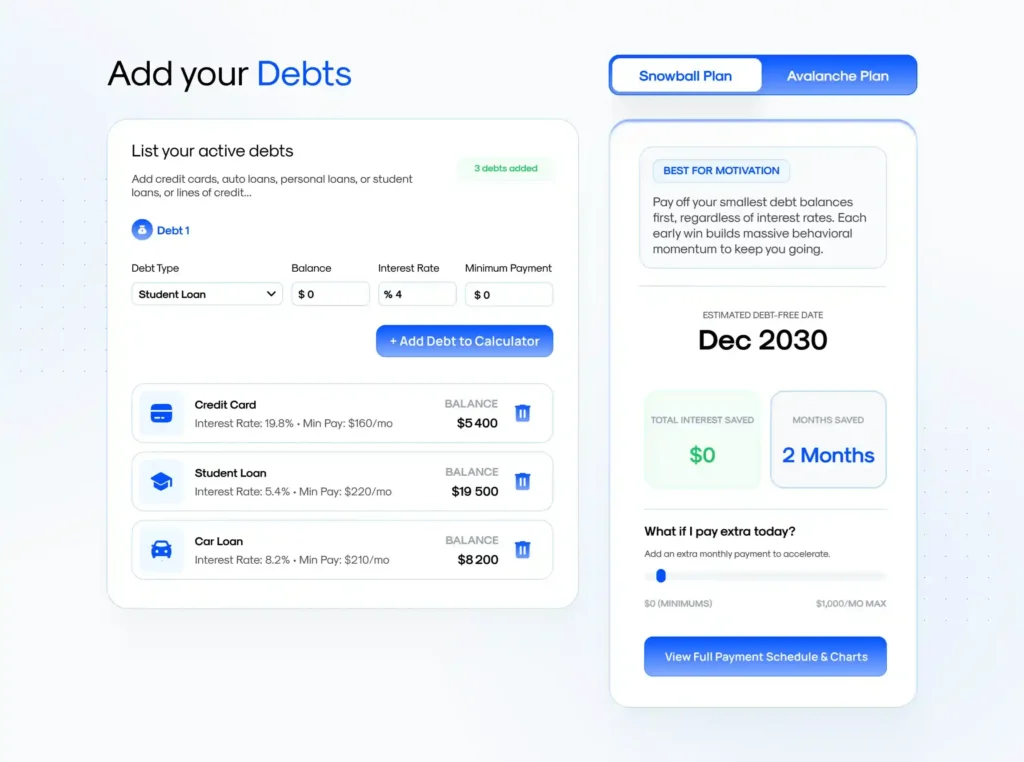
Snowball vs. Avalanche Strategies
Once your debts are entered, you can seamlessly toggle between two mathematically proven payoff strategies:
- The Snowball Plan (Best for Motivation): This strategy orders your debts from the smallest balance to the largest. By paying off smaller debts first, you experience quick “wins” that build psychological momentum.
- The Avalanche Plan (Most Cost-Effective): This strategy prioritizes debts with the highest interest rates. Mathematically, this minimizes the total compound interest you pay over time, saving you the maximum amount of money.
Extra Payments & PDF Roadmaps
Use the “Extra Payment” slider to see how adding additional funds to your monthly budget accelerates your debt-free date. Once you are satisfied with your plan, you can enter your email address to receive a secure, beautifully formatted PDF roadmap detailing your exact month-by-month payment schedule.
2. Accounts, Privacy, and Data Security
We take your financial privacy seriously. ZenPayoff employs enterprise-grade AES-256 encryption to protect your data.
Do I need an account to use the calculator?
No. You can use the calculator completely anonymously as a guest. However, creating a free account allows you to securely save your debt profiles so you do not have to re-enter your numbers every time you visit the site.
How is my data stored?
If you choose to create an account (via Email, Google, or Apple ID), your calculation profiles are stored securely in our cloud database. We never sell your data to third-party marketers or credit bureaus.
3. Digital Shop & Order Delivery
ZenPayoff offers premium digital products, including interactive budget spreadsheets, Notion frameworks, and mastery workbooks to accelerate your financial journey.
How are products delivered?
All products are delivered digitally. Immediately after a successful checkout, you will receive an email containing a secure download link. You will not receive any physical items in the mail.
Download Limits and Expiration
To protect our intellectual property and prevent unauthorized sharing, your secure download links are subject to limitations. Links will expire 30 days after purchase, and you are limited to a maximum of 5 download attempts per file. Please ensure you download and save the files to your personal device (computer, tablet, or smartphone) promptly after purchase.
I didn’t receive my download link. What should I do?
Emails are dispatched instantly. If you do not see the email in your inbox within 5 minutes, please check your Spam, Junk, or Promotions folders. If you checked out using an Apple ID with the “Hide My Email” feature, the link will be routed to the proxy email address connected to your iCloud account.
4. Billing, Payments, and Refunds
Accepted Payment Methods
We process all transactions securely through Stripe, a global leader in payment processing. We accept all major Credit and Debit cards, as well as expedited checkout options including Apple Pay and Google Pay. ZenPayoff never stores your raw credit card information on our servers.
Refund Policy
Because our products are delivered instantly as digital files, they cannot be “returned.” Therefore, all sales are final. We provide comprehensive descriptions, feature lists, and preview images on every product page so you can make an informed decision before purchasing. For more details, please review our Terms of Service.
5. Contacting Customer Support
If you require technical assistance with a spreadsheet, have a question about your account, or want to request a new feature for the calculator, our support team is ready to help.
You can reach out to us via our Contact Form, or email us directly at support@zenpayoff.com. We aim to respond to all inquiries within 24 to 48 business hours.