 ZenPayoff is a 100% free tool. No hidden fees. No forced registration required.
How to Use a Debt Payoff Spreadsheet to Automate Your Finances
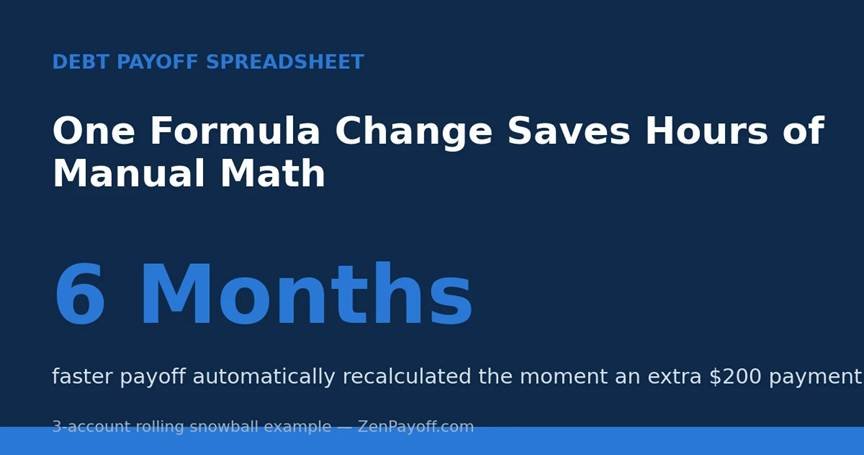
Infographic showing a debt payoff spreadsheet automatically recalculating a payoff date after an extra payment
How to Use a Debt Payoff Spreadsheet to Automate Your Finances
A printed amortization table cannot do what a debt payoff spreadsheet can: it automatically recalculatesthe moment your actual figures change. Whether you make an extra payment, skip one due to an unexpected expense, or notice your APR move on a variable-rate account, a well-constructed spreadsheet will instantly update all the subsequent figures. On the other hand, a fixed plan in print becomes out of date as soon as reality differs from the original assumptions.
Why Manual Recording Breaks Down
After having looked at a large number of handwritten and roughly recorded payoff plans, I have repeatedly observed the same kind of failure: a person draws up a well-constructed plan in a notebook or makes a single calculation, sticks to it faithfully for two or three months, then makes one extra payment or fails to make one, after which the whole forecast ends up being incorrect. Instead of recalculating the figures, most people give up on keeping precise records and thus lose the degree of visibility that was originally what made the plan so motivating.
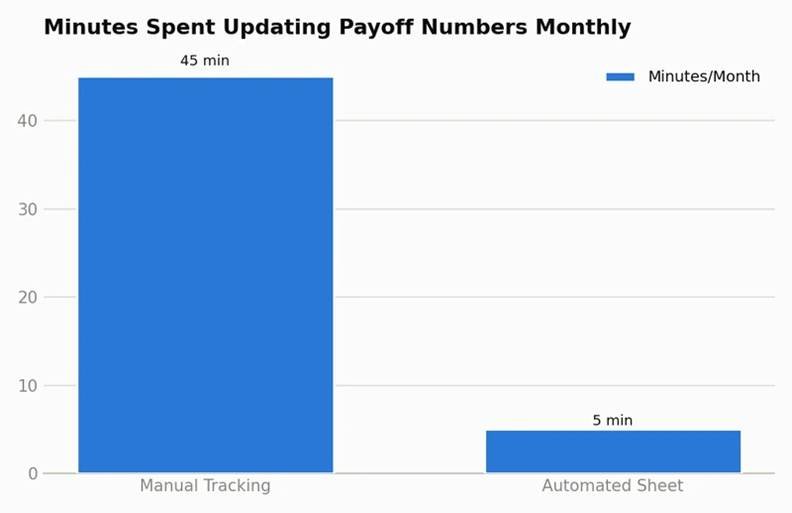
Bar chart comparing time spent per month on manual debt tracking versus an automated spreadsheet
What a Well-Built Spreadsheet Actually Automates
A functional debt payoff spreadsheet handles four calculations that are tedious and error-prone to redo by hand every month:
- The interest is calculated every day or each month according to your real APR and the current balance, not as an approximate figure.
- With each payment the amount going to the principal and the amount going to the interest is separated, so that you can see clearly how much of each payment is actually reducing the total that you owe.
- The ‘rolling’ feature, which automatically redirects the payment made available by paying off one account to the next account in the order you have selected (whether it be snowball, avalanche, or a custom combination).
- The exact payoff date for each account and for the plan as a whole is displayed in real time whenever you alter a payment amount or record an additional payment.
A Worked Example: What Automation Actually Changes
Consider three accounts: one with a balance of $2,200 at an APR of 24%, another with $5,100 at 19% APR, and a third with $7,800 at 12% APR, with a total of $650 per month available. With the first plan (that is, the avalanche method and no additional payments), the debt will be paid off in around 30 months.
Imagine that in month 4 you get an unexpected bonus of $200 and use it all to pay down the principal on the account with the highest interest rate. A static, one-off calculation carried out at the beginning of the plan can’t take this into account — you’d have to manually rework the entire remaining amortisation schedule by hand in order to find out the new payoff date. In contrast, an automated spreadsheet recalcuates immediately: by making that single $200 payment early when the balance on the highest-rate account is at its largest, the total length of the plan is reduced by about 6 months and the total interest is lowered by nearly $310 — a result that can only be seen by actually running the revised figures, not by guessing.
Building the Core Formula Structure
If you’re building your own tracker rather than using a pre-built template, the essential formula logic for each account, updated monthly, looks like this:
- Interest this period = current balance × (APR ÷ 12)
- Principal reduction = payment amount − interest this period
- New balance = current balance − principal reduction
- Months remaining = calculated by iterating steps 1-3 forward until balance reaches zero, or by using a built-in amortization formula
- Rolled payment occurs when an account reaches zero and the full payment amount (minimum plus any additional amount) is added to the next account’s payment according to the order you have chosen.
The difficulty doesn’t lie in any particular formula but in connecting all of your accounts together; only in that way can a change in one cause the appropriate cascade effect to the other accounts, which is why most manually constructed spreadsheets begin to fail when you include more accounts.
Where People Get Stuck Building Their Own
The three most common breakdowns I see in self-built payoff spreadsheets:
- If the payoff order is hard-coded rather than having a formula that automatically recalculates the priority list when the balances change, then the spreadsheet will become inaccurate the moment one account is paid off early or another account is added.
- Approximating monthly interest rather than taking into account daily accrual can significantly underestimate the interest on credit accounts that have high APRs and large balances.
- The failure to take into consideration changes in the minimum payment occurs because the percentage-based minimum decreases as the balance declines.
If the idea of working out the details from scratch seems to involve more spreadsheet work than you’re willing to carry out, you can obtaina premium debt payoff spreadsheet from our shop which already includes the rolling-payment logic, the calculation of interest on a daily basis, and the automatic recalculation of priority — all you then have to do is enter your real balances, rates, and available payment amount.
Modeling Different Scenarios Before Committing
A valuable but often overlooked advantage of using an automated sheet is that it allows you to examine “what if” situations without having to restart your whole plan—for example, what if you added $50 a month? What if you combined two cards into a single loan? What if the interest rate increased by two points? Instead of having to recalculate each scenario by hand, you can use our free debt payoff calculator to quickly test these cases and then see side by side both the resulting payoff date and the total interest.
Keeping the Spreadsheet Accurate Over Time
Automation is of only limited use if the data remain up to date; therefore, set a recurring reminder—monthly, immediately after your statements have been closed—to update the actual balances and to verify that your APRs have not changed, in particular for variable-rate accounts. A spreadsheet based on outdated figures from three months ago is probably no better than one that doesn’t exist at all, since it leads to a false sense of confidence in figures that no longer match reality.
What the Data Says About Tracking Behavior
Although there is no single definitive study which focuses on the use of spreadsheets, research carried out by the Federal Reserve on household finances regularly reveals that households which have a better view of their debt responsibilities show greater confidence in their ability to become free from debt—a trend that is in line with the effect usually obtained through active tracking, whether or not it is automated. The Investopedia article on amortization schedules also explains why the difference between the amount of principal and the amount of interest changes over time, which is precisely what an automated spreadsheet works out without you having to understand the underlying formula.
A Simple Test to Check Your Sheet’s Accuracy
Before you use any spreadsheet—whether it’s one that you’ve made yourself or one that you’ve downloaded—to plan your actual finances, carry out a simple verification: select one account, work out by hand using the formula mentioned above how much interest and how much principal it will have next month, and then compare this with the figures that the spreadsheet gives. If the two amounts agree, you can have confidence in the logic behind all of your other accounts. But if they don’t match, then there is an error in the formula chain that should be corrected before you rely on the projected payoff date for making real decisions. Experience has shown me that this one five-minute check catches more spreadsheet errors than any other single step that people omit when setting up their own tracker.
Sharing a Spreadsheet With a Partner
When you and your spouse or partner are working together to pay off debt, a shared spreadsheet deals with a kind of coordination issue that is all too easy to overlook. Both of you need to look at the same figures, understand the same order of priorities, and have a clear idea of what is expected of you each month. By using a cloud-based shared sheet which is updated by the person who makes the payment that month, both partners can stay in sync without having to have a separate conversation each time a balance changes.
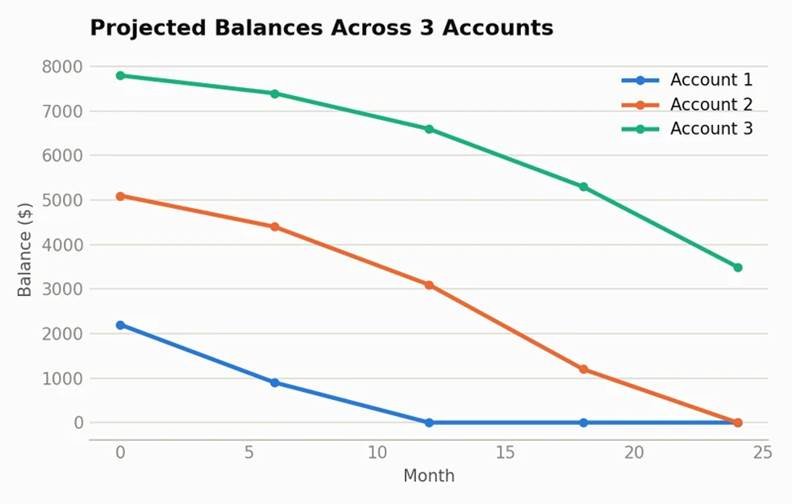
Line chart showing projected balance decline across three accounts tracked in a debt payoff spreadsheet
The Bottom Line
A spreadsheet for paying off debt is only as useful as its ability to stay accurate when your actual financial situation inevitably differs from the original plan. By automating the calculation of interest, the division of the principal, and the logic for rolling payments, you turn what would otherwise be a one-off calculation into an active tool that keeps up with reality each time you make a payment—whether it’s an extra one, on time, or otherwise—instead of having to redo the calculations by hand every time there’s a change.